Reading the affiliate numbers
The columns read left to right: clicks become sign-ups, sign-ups become funds, and a share of the funds becomes commission.
Requested Commission is a liability you owe, not income and not optional — leave it unpaid and the affiliate stops referring.
What it controls
- how many clicks a referral actually drew
- how many of those became paying clients
- what the affiliate has earned and asked for
How to set it
- Open Affiliates → Referral logs.
- Read across: R. Code, R. Owner, R. Clicks, R. Sign Up, R. Conversion Rate.
- Then R. Total Funds, R. Earned Commission, R. Requested Commission, R. Total Commission, R. Status.
- Click Action → View Referred Users to list who signed up under the code.
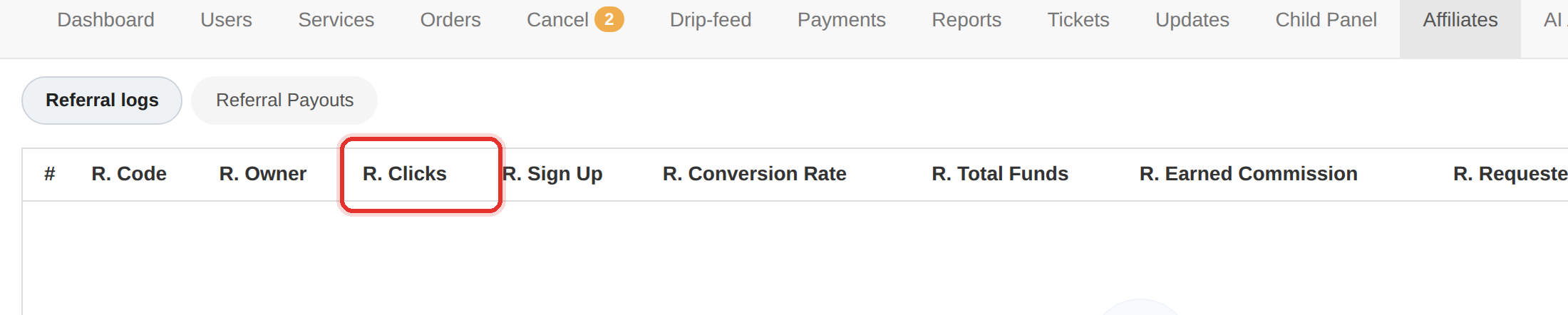
| Column | What it shows |
|---|---|
| R. Code | the referral code |
| R. Owner | the client who owns the code |
| R. Clicks | clicks on the referral link |
| R. Sign Up | clients who signed up through it |
| R. Conversion Rate | sign-ups as a share of clicks |
| R. Total Funds | money those referrals deposited |
| R. Earned Commission | commission earned so far |
| R. Requested Commission | commission the affiliate has asked to withdraw |
| R. Total Commission | commission earned in total |
| R. Status | Active or Inactive |
Commission is paid out from the Referral Payouts tab: a Pending request offers Approve, Disapprove and Reject.
High clicks with a flat sign-up count is the signature of bought traffic. Do not pay commission on funds that never arrived — reconcile against Payments first.
Requested Commission is a liability you owe, not a bonus. It is money the affiliate has earned and asked for; unpaid, it is a debt, and the referrals stop.
To learn more, see the Affiliates guide.